| Name |
Nachricht |
schmid01

Siedler
7 Beiträge
|

|
Gorba Frontanzeige und CU5 hacking, 24 Dec. 2022 00:03
|
|
Liebe Leute ich habe eine Gorba Frontanzeige bekommen und nun dieses tolle Forum gefunden.
Dank euch kann ich nun auch die Anzeige via Alphabus mit dem CU5 ansteuern.
Mein Ziel wäre es die Anzeige direkt mit einem Arduino oder Raspberry Pi ansteuern zu können. Hat da schon wer Erfahrungen damit?
Was ich bisher über den Alpha-BUS recherchieren konnte ist:
Datenübertragung mit 19200 Bit/s bidirektional auf einer Leitung (Signal Alpha DAT) 8 Datenbits, 2 Stopbits, Parität: keine
Spannungshub der seriellen Datenübertragung: 24V
Das müsste also gut interpretierbar sein.
Als nächstes würde ich dann mal das Testprogramm laufenlassen und das Protokoll analysieren. Das zeigt ja schöne Schachbrettmuster.
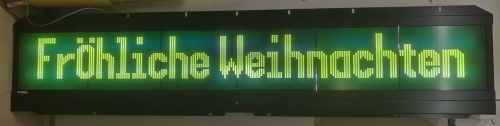
Herzliche Grüsse aus der Schweiz und fröhliche Weihnachten.
Simon
Geändert von schmid01 am 31.Dec.2022 14:24
|
|
| |
Beitragsbewertung:
|
xd19@o2.pl
Siedler
49 Beiträge
|
RE: Gorba Frontanzeige und CU5 hacking, 24 Dec. 2022 12:31
|
Ich bin nicht sicher aber Monobus kann wie US Luminator Protokoll sein. Ich habe gehoert dass jemand hat Monomaster benutzt um Luminator zu steuern.
Und die dokumentation gibt es hier https://alusch.github.io/flipdot-protocol/
Kannst du bitte Vorbildtransaktionen von deinen Anzeige uploaden?
Geändert von xd19@o2.pl am 24.Dec.2022 12:35
|
|
| |
Beitragsbewertung:
|
schmid01
Siedler
7 Beiträge
|
RE: Gorba Frontanzeige und CU5 hacking, 31 Dec. 2022 14:12
|
Danke für de spannende Link zu alusch.github.io/flipdot-protocol/ ich muss das noch genauer anscheuen, Mein Serial Dump schaut etwas anders aus.
Ich habe mal diesen GitHub begonnen: github.com/d3bu9/alpha-bus
Leider scheint sich beim Experimentieren das CU5 aufgehängt zu haben. Dieses meldet nun immer "Keine Daten".
Wenn ich mit der Kombination T+/T- einen eigenen Text erstelle, startet das CU5 neu.
Wenn ich mit der Kombination H-/Z-/E- das Testprogramm aufrufe, findet er die Anzeige, läuft jedoch viel schneller durch als sonst und auf dem LCD erscheint nur ein Pixel-Wirr-Warr.
Es zeigt beim Start folgende Version:
GORBA AG
V1.G18 642.642 05-05-09
Geändert von schmid01 am 7.Jan.2023 2:20
|
|
| |
Beitragsbewertung:
|
xd19@o2.pl
Siedler
49 Beiträge
|
RE: Gorba Frontanzeige und CU5 hacking, 01 Jan. 2023 16:13
|
Maybe I‘ll swich language for convenience :)
The documentation ( https://wiki.pixelbar.nl/images/9/92/MONO_XY5.pdf, page 10) suggests that this protocol is some kind of HDLC protocol - https://en.wikipedia.org/wiki/High-Level_Data_Link_Control#HDLC_operations_and_frame_types
And this generally makes sense - it looks that frames start and mostly end with 0x7E.
What is unclear is the checksum. It cannot be CRC16 since there are not enough bytes and most patterns suggest that it does exist. In the short messages the checksum gets smaller as the data gets bigger and it seems to follow CS = 0xFF - D, but I have no idea how to replicate that to longer sequences.
Also this part seems suspicious
0x7E, 0x8E, 0x24, 0x12, 0x58, 0x7E, 0x00, 0x00,
0x7E, 0x91, 0x24, 0x12, 0x58, 0x7E, 0x00, 0x00,
0x7E, 0x91, 0x24, 0x12, 0x58, 0x7E, 0x00, 0x00,
0x7E, 0x91, 0x24, 0x12, 0x58, 0x7E, 0x00, 0x00,
because the checksum 0x58 is identical for different sequences. If it is a checksum at all.
Also the amount of data seems wrong - 32x216 should need no less than 504 bytes if no compression is used.
I think it would be useful if you could prepare a few more dumps:
- startup with identification
- a few minutes of work
- changing between texts (to blank and to other texts)
- some patterns.
I think it would also be really helpful if you could set the display to a few different addresses
|
|
| |
Beitragsbewertung:
|
schmid01
Siedler
7 Beiträge
|

|
RE: Gorba Frontanzeige und CU5 hacking, 07 Jan. 2023 02:19
|
|
Hallo Siedler
Ich habe es geschafft, die komplette Kommunikation mit dem CU5 in einem Python Script zu simmullieren.
Dazu habe ich einen weitere Serial-Dump gemacht, dieser zeigt nur einen Strich in der Mitte der Anzeige.
Nun arbeite ich daran, die Pixel zu manipulieren. Dazu muss jedoch erst noch die Checksumme berechnet werden können. Was bereits möglich ist, ist Bytes zu vertauschen.
Die beiden Serial Dumps kannst du im GitHub downloaden:
Alpha-Bus_Fröhliche_Weihnachten.csv
Alpha-Bus_Strich.csv
PS. Leider kann ich keine weiteren Dumps mit anderen Adressen machen, da sich das CU5 während der Analyse verabschiedet hat.
Gerne hier der Serialdump eines Striches (4x26 Pixel) in der Mitte der Anzeige mit 32 x 216 Pixel:
CU-5;0x7E,0x81,0x7D,0x5E,0x7E
LCD;0x7E,0x01,0x4C,0x4D,0x01,0x56,0x31,0x35,0xAC,0x7E
CU-5;0x7E,0x82,0x7D,0x5D,0x7E
CU-5;0x7E,0x83,0x7C,0x7E
CU-5;0x7E,0x84,0x7B,0x7E
CU-5;0x7E,0x85,0x7A,0x7E
CU-5;0x7E,0x86,0x79,0x7E
CU-5;0x7E,0x87,0x78,0x7E
CU-5;0x7E,0x88,0x77,0x7E
CU-5;0x7E,0x89,0x76,0x7E
CU-5;0x7E,0x8A,0x75,0x7E
CU-5;0x7E,0x8B,0x74,0x7E
CU-5;0x7E,0x8C,0x73,0x7E
CU-5;0x7E,0x8D,0x72,0x7E
CU-5;0x7E,0x8E,0x7D,0x5E,0x7E,0x00,0x00
CU-5;0x7E,0x81,0x7D,0x5E,0x7E
LCD;0x7E,0x01,0x4C,0x4D,0x01,0x56,0x31,0x35,0xAC,0x7E
CU-5;0x7E,0x91,0x24,0x12,0x58,0x7E
LCD;0x7E,0x11,0x7E
# Hier beginnt die Übertragung der Pixe der ungeraden Zeilen
# 1. Modul Spalte 1-12
CU-5;0x7E,0xA1,0x24,0x90,0x00,0x00,0x00,0x00,0x00,0x90,0x00,0x00,0x00,0x00,0x00,0x90,0x00,0x00,0x00,0x00,0x00,0x90,0x00,0x00,0x00,0x00,0x00,0x90,0x00,0x00,0x00,0x00,0x00,0xEA,0x7E
LCD;0x7E,0x21,0x7E
# 1. Modul Spalte 13-24
CU-5;0x7E,0xA1,0x23,0x90,0x00,0x00,0x00,0x00,0x00,0x90,0x00,0x00,0x00,0x00,0x00,0x90,0x00,0x00,0x00,0x00,0x00,0x90,0x00,0x00,0x00,0x00,0x00,0x90,0x00,0x00,0x00,0x00,0x00,0xED,0x7E
LCD;0x7E,0x21,0x7E
# 1. Modul Spalte 25-36
CU-5;0x7E,0xA1,0x22,0x90,0x00,0x00,0x00,0x00,0x00,0x90,0x00,0x00,0x00,0x00,0x00,0x90,0x00,0x00,0x00,0x00,0x00,0x90,0x00,0x00,0x00,0x00,0x00,0x90,0x00,0x00,0x00,0x00,0x00,0xEC,0x7E
# 2. Modul ...
LCD;0x7E,0x21,0x7E
CU-5;0x7E,0xA1,0x21,0x90,0x00,0x00,0x00,0x00,0x00,0x90,0x00,0x00,0x00,0x00,0x00,0x90,0x00,0x00,0x00,0x00,0x00,0x90,0x00,0x00,0x00,0x00,0x00,0x90,0x00,0x00,0x00,0x00,0x00,0xEF,0x7E
LCD;0x7E,0x21,0x7E
CU-5;0x7E,0xA1,0x20,0x90,0x00,0x00,0x00,0x00,0x00,0x90,0x00,0x00,0x00,0x00,0x00,0x90,0x00,0x00,0x00,0x00,0x00,0x90,0x00,0x00,0x00,0x00,0x00,0x90,0x00,0x00,0x00,0x00,0x00,0xEE,0x7E
LCD;0x7E,0x21,0x7E
CU-5;0x7E,0xA1,0x1F,0x90,0x00,0x00,0x00,0x00,0x00,0x90,0x00,0x00,0x00,0x00,0x00,0x90,0x00,0x00,0x00,0x00,0x00,0x90,0x00,0x00,0x00,0x00,0x00,0x90,0x00,0x00,0x00,0x00,0x00,0xD1,0x7E
LCD;0x7E,0x21,0x7E
CU-5;0x7E,0xA1,0x1E,0x90,0x00,0x00,0x00,0x00,0x00,0x90,0x00,0x00,0x00,0x00,0x00,0x90,0x00,0x00,0x00,0x00,0x00,0x90,0x00,0x00,0x00,0x00,0x00,0x90,0x00,0x00,0x00,0x00,0x00,0xD0,0x7E
LCD;0x7E,0x21,0x7E
CU-5;0x7E,0xA1,0x1D,0x90,0x00,0x00,0x00,0x00,0x00,0x90,0x00,0x00,0x00,0x00,0x00,0x90,0x00,0x00,0x00,0x00,0x00,0x90,0x00,0x00,0x00,0x00,0x00,0x90,0x00,0x00,0x00,0x00,0x00,0xD3,0x7E
LCD;0x7E,0x21,0x7E
CU-5;0x7E,0xA1,0x1C,0x90,0x7F,0x3F,0x00,0x00,0x00,0x90,0x00,0x00,0x00,0x00,0x00,0x90,0x00,0x00,0x00,0x00,0x00,0x90,0x00,0x00,0x00,0x00,0x00,0x90,0x00,0x00,0x00,0x00,0x00,0x92,0x7E
LCD;0x7E,0x21,0x7E
CU-5;0x7E,0xA1,0x1B,0x90,0x00,0x00,0x00,0x00,0x00,0x90,0x00,0x00,0x00,0x00,0x00,0x90,0x00,0x00,0x00,0x00,0x00,0x90,0x00,0x00,0x00,0xC0,0xDF,0x90,0x3C,0x7F,0x3F,0x7F,0x3F,0xF6,0x7E
LCD;0x7E,0x21,0x7E
CU-5;0x7E,0xA1,0x1A,0x90,0x00,0x00,0x00,0x00,0x00,0x90,0x00,0x00,0x00,0x00,0x00,0x90,0x00,0x00,0x00,0x00,0x00,0x90,0x00,0x00,0x00,0x00,0x00,0x90,0x00,0x00,0x00,0x00,0x00,0xD4,0x7E
LCD;0x7E,0x21,0x7E
CU-5;0x7E,0xA1,0x19,0x90,0x00,0x00,0x00,0x00,0x00,0x90,0x00,0x00,0x00,0x00,0x00,0x90,0x00,0x00,0x00,0x00,0x00,0x90,0x00,0x00,0x00,0x00,0x00,0x90,0x00,0x00,0x00,0x00,0x00,0xD7,0x7E
LCD;0x7E,0x21,0x7E
CU-5;0x7E,0xA1,0x18,0x90,0x00,0x00,0x00,0x00,0x00,0x90,0x00,0x00,0x00,0x00,0x00,0x90,0x00,0x00,0x00,0x00,0x00,0x90,0x00,0x00,0x00,0x00,0x00,0x90,0x00,0x00,0x00,0x00,0x00,0xD6,0x7E
LCD;0x7E,0x21,0x7E
CU-5;0x7E,0xA1,0x17,0x90,0x00,0x00,0x00,0x00,0x00,0x90,0x00,0x00,0x00,0x00,0x00,0x90,0x00,0x00,0x00,0x00,0x00,0x90,0x00,0x00,0x00,0x00,0x00,0x90,0x00,0x00,0x00,0x00,0x00,0xD9,0x7E
LCD;0x7E,0x21,0x7E
CU-5;0x7E,0xA1,0x16,0x90,0x00,0x00,0x00,0x00,0x00,0x90,0x00,0x00,0x00,0x00,0x00,0x90,0x00,0x00,0x00,0x00,0x00,0x90,0x00,0x00,0x00,0x00,0x00,0x90,0x00,0x00,0x00,0x00,0x00,0xD8,0x7E
LCD;0x7E,0x21,0x7E
CU-5;0x7E,0xA1,0x15,0x90,0x00,0x00,0x00,0x00,0x00,0x90,0x00,0x00,0x00,0x00,0x00,0x90,0x00,0x00,0x00,0x00,0x00,0x90,0x00,0x00,0x00,0x00,0x00,0x90,0x00,0x00,0x00,0x00,0x00,0xDB,0x7E
LCD;0x7E,0x21,0x7E
CU-5;0x7E,0xA1,0x14,0x90,0x00,0x00,0x00,0x00,0x00,0x90,0x00,0x00,0x00,0x00,0x00,0x90,0x00,0x00,0x00,0x00,0x00,0x90,0x00,0x00,0x00,0x00,0x00,0x90,0x00,0x00,0x00,0x00,0x00,0xDA,0x7E
LCD;0x7E,0x21,0x7E
CU-5;0x7E,0xA1,0x13,0x90,0x00,0x00,0x00,0x00,0x00,0x90,0x00,0x00,0x00,0x00,0x00,0x90,0x00,0x00,0x00,0x00,0x00,0x90,0x00,0x00,0x00,0x00,0x00,0x90,0x00,0x00,0x00,0x00,0x00,0xDD,0x7E
LCD;0x7E,0x21,0x7E
# Hier beginnt die Übertragung der Pixe der geraden Zeilen
# 1. Modul Spalte 1-12
CU-5;0x7E,0xA1,0x12,0x10,0x00,0x00,0x00,0x00,0x00,0x10,0x00,0x00,0x00,0x00,0x00,0x10,0x00,0x00,0x00,0x00,0x00,0x10,0x00,0x00,0x00,0x00,0x00,0x10,0x00,0x00,0x00,0x00,0x00,0x5C,0x7E
LCD;0x7E,0x21,0x7E
# 1. Modul Spalte 13-14
CU-5;0x7E,0xA1,0x11,0x10,0x00,0x00,0x00,0x00,0x00,0x10,0x00,0x00,0x00,0x00,0x00,0x10,0x00,0x00,0x00,0x00,0x00,0x10,0x00,0x00,0x00,0x00,0x00,0x10,0x00,0x00,0x00,0x00,0x00,0x5F,0x7E
LCD;0x7E,0x21,0x7E
# 1. Modul Spalte 25-36
CU-5;0x7E,0xA1,0x10,0x10,0x00,0x00,0x00,0x00,0x00,0x10,0x00,0x00,0x00,0x00,0x00,0x10,0x00,0x00,0x00,0x00,0x00,0x10,0x00,0x00,0x00,0x00,0x00,0x10,0x00,0x00,0x00,0x00,0x00,0x5E,0x7E
LCD;0x7E,0x21,0x7E
# 2. Modul ...
CU-5;0x7E,0xA1,0x0F,0x10,0x00,0x00,0x00,0x00,0x00,0x10,0x00,0x00,0x00,0x00,0x00,0x10,0x00,0x00,0x00,0x00,0x00,0x10,0x00,0x00,0x00,0x00,0x00,0x10,0x00,0x00,0x00,0x00,0x00,0x41,0x7E
LCD;0x7E,0x21,0x7E
CU-5;0x7E,0xA1,0x0E,0x10,0x00,0x00,0x00,0x00,0x00,0x10,0x00,0x00,0x00,0x00,0x00,0x10,0x00,0x00,0x00,0x00,0x00,0x10,0x00,0x00,0x00,0x00,0x00,0x10,0x00,0x00,0x00,0x00,0x00,0x40,0x7E
LCD;0x7E,0x21,0x7E
CU-5;0x7E,0xA1,0x0D,0x10,0x00,0x00,0x00,0x00,0x00,0x10,0x00,0x00,0x00,0x00,0x00,0x10,0x00,0x00,0x00,0x00,0x00,0x10,0x00,0x00,0x00,0x00,0x00,0x10,0x00,0x00,0x00,0x00,0x00,0x43,0x7E
LCD;0x7E,0x21,0x7E
CU-5;0x7E,0xA1,0x0C,0x10,0x00,0x00,0x00,0x00,0x00,0x10,0x00,0x00,0x00,0x00,0x00,0x10,0x00,0x00,0x00,0x00,0x00,0x10,0x00,0x00,0x00,0x00,0x00,0x10,0x00,0x00,0x00,0x00,0x00,0x42,0x7E
LCD;0x7E,0x21,0x7E
CU-5;0x7E,0xA1,0x0B,0x10,0x00,0x00,0x00,0x00,0x00,0x10,0x00,0x00,0x00,0x00,0x00,0x10,0x00,0x00,0x00,0x00,0x00,0x10,0x00,0x00,0x00,0x00,0x00,0x10,0x00,0x00,0x00,0x00,0x00,0x45,0x7E
LCD;0x7E,0x21,0x7E
CU-5;0x7E,0xA1,0x0A,0x10,0x3F,0x7F,0x00,0x00,0x00,0x10,0x00,0x00,0x00,0x00,0x00,0x10,0x00,0x00,0x00,0x00,0x00,0x10,0x00,0x00,0x00,0x00,0x00,0x10,0x00,0x00,0x00,0x00,0x00,0x04,0x7E
LCD;0x7E,0x21,0x7E
CU-5;0x7E,0xA1,0x09,0x10,0x00,0x00,0x00,0x00,0x00,0x10,0x00,0x00,0x00,0x00,0x00,0x10,0x00,0x00,0x00,0x00,0x00,0x10,0x00,0x00,0x00,0xC0,0xCF,0x10,0x7C,0x3F,0x7F,0x3F,0x7F,0x34,0x7E
LCD;0x7E,0x21,0x7E
CU-5;0x7E,0xA1,0x08,0x10,0x00,0x00,0x00,0x00,0x00,0x10,0x00,0x00,0x00,0x00,0x00,0x10,0x00,0x00,0x00,0x00,0x00,0x10,0x00,0x00,0x00,0x00,0x00,0x10,0x00,0x00,0x00,0x00,0x00,0x46,0x7E
LCD;0x7E,0x21,0x7E
CU-5;0x7E,0xA1,0x07,0x10,0x00,0x00,0x00,0x00,0x00,0x10,0x00,0x00,0x00,0x00,0x00,0x10,0x00,0x00,0x00,0x00,0x00,0x10,0x00,0x00,0x00,0x00,0x00,0x10,0x00,0x00,0x00,0x00,0x00,0x49,0x7E
LCD;0x7E,0x21,0x7E
CU-5;0x7E,0xA1,0x06,0x10,0x00,0x00,0x00,0x00,0x00,0x10,0x00,0x00,0x00,0x00,0x00,0x10,0x00,0x00,0x00,0x00,0x00,0x10,0x00,0x00,0x00,0x00,0x00,0x10,0x00,0x00,0x00,0x00,0x00,0x48,0x7E
LCD;0x7E,0x21,0x7E
CU-5;0x7E,0xA1,0x05,0x10,0x00,0x00,0x00,0x00,0x00,0x10,0x00,0x00,0x00,0x00,0x00,0x10,0x00,0x00,0x00,0x00,0x00,0x10,0x00,0x00,0x00,0x00,0x00,0x10,0x00,0x00,0x00,0x00,0x00,0x4B,0x7E
LCD;0x7E,0x21,0x7E
CU-5;0x7E,0xA1,0x04,0x10,0x00,0x00,0x00,0x00,0x00,0x10,0x00,0x00,0x00,0x00,0x00,0x10,0x00,0x00,0x00,0x00,0x00,0x10,0x00,0x00,0x00,0x00,0x00,0x10,0x00,0x00,0x00,0x00,0x00,0x4A,0x7E
LCD;0x7E,0x21,0x7E
CU-5;0x7E,0xA1,0x03,0x10,0x00,0x00,0x00,0x00,0x00,0x10,0x00,0x00,0x00,0x00,0x00,0x10,0x00,0x00,0x00,0x00,0x00,0x10,0x00,0x00,0x00,0x00,0x00,0x10,0x00,0x00,0x00,0x00,0x00,0x4D,0x7E
LCD;0x7E,0x21,0x7E
CU-5;0x7E,0xA1,0x02,0x10,0x00,0x00,0x00,0x00,0x00,0x10,0x00,0x00,0x00,0x00,0x00,0x10,0x00,0x00,0x00,0x00,0x00,0x10,0x00,0x00,0x00,0x00,0x00,0x10,0x00,0x00,0x00,0x00,0x00,0x4C,0x7E
LCD;0x7E,0x21,0x7E
CU-5;0x7E,0xA1,0x01,0x10,0x00,0x00,0x00,0x00,0x00,0x10,0x00,0x00,0x00,0x00,0x00,0x10,0x00,0x00,0x00,0x00,0x00,0x10,0x00,0x00,0x00,0x00,0x00,0x10,0x00,0x00,0x00,0x00,0x00,0x4F,0x7E
LCD;0x7E,0x21,0x7E
# Ende der Übertragung der Pixel
CU-5;0x7E,0x81,0x7D,0x5E,0x7E
LCD;0x7E,0x01,0x4C,0x4D,0x01,0x56,0x31,0x35,0xAC,0x7E
CU-5;0x7E,0x82,0x7D,0x5D,0x7E
CU-5;0x7E,0x82,0x7D,0x5D,0x7E
CU-5;0x7E,0x82,0x7D,0x5D,0x7E
CU-5;0x7E,0x82,0x7D,0x5D,0x7E
CU-5;0x7E,0x83,0x7C,0x7E
CU-5;0x7E,0x83,0x7C,0x7E
CU-5;0x7E,0x83,0x7C,0x7E
CU-5;0x7E,0x84,0x7B,0x7E
CU-5;0x7E,0x84,0x7B,0x7E
CU-5;0x7E,0x84,0x7B,0x7E
CU-5;0x7E,0x87,0x78,0x7E
CU-5;0x7E,0x87,0x78,0x7E
Geändert von schmid01 am 7.Jan.2023 2:50
|
|
| |
Beitragsbewertung:
|
xd19@o2.pl
Siedler
49 Beiträge
|
RE: Gorba Frontanzeige und CU5 hacking, 07 Jan. 2023 22:13
|
It took me more time than it should but the checksum (at least in the longer sequences) is just XOR of all bytes with initial seed of 0xFF.
I drafted a short code which loads and splits the csv files https://pastebin.com/uKv2JSax . It also handles the escaping.
Also I think you should notice the repeating 0x90 (in the first half) and 0x10 (in the second) in the same places - these are maybe some control characters?
I‘ll have to play a little more with the pixel arrangement in the data because it‘s hard to see anything in there.
|
|
| |
Beitragsbewertung:
|
schmid01
Siedler
7 Beiträge
|
RE: Gorba Frontanzeige und CU5 hacking, 16 Jan. 2023 22:36
|
Thanks, I also found out the Checksum, but did not post here yet. So I came to the same result and built the folowing Python function:
def checksum(data):
xorval = 0
for el in data:
xorval ^= el
return 255 - xorval
I also had success by writing a little Programm, thats able to send the graphics to the sign. It‘s now possible to change some values and it works.
But as you mentioned, it‘s quit hard, to find out, how the pixels are arranged.
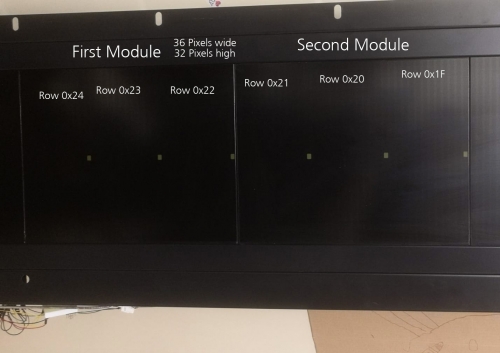
What I see: the first 18 Lines (0x24-0x13) build the odd lines on the sign, the second 18 Lines (0x12-0x01) build the even lines on the sign (or viceversa).
One Line represents a third of a signle 32 x 36 Panel.
In the Picture you see the result, when I send
# First Module from left
row_24 = [0xA1,0x24,0x90,0x01,0x00,0x00,0x00,0x00,0x90,0x00,0x00,0x00,0x00,0x00,0x90,0x00,0x00,0x00,0x00,0x00,0x90,0x00,0x00,0x00,0x00,0x00,0x90,0x00,0x00,0x00,0x00,0x00] # Testpattern
row_23 = [0xA1,0x23,0x90,0x01,0x00,0x00,0x00,0x00,0x90,0x00,0x00,0x00,0x00,0x00,0x90,0x00,0x00,0x00,0x00,0x00,0x90,0x00,0x00,0x00,0x00,0x00,0x90,0x00,0x00,0x00,0x00,0x00] # Testpattern
row_22 = [0xA1,0x22,0x90,0x01,0x00,0x00,0x00,0x00,0x90,0x00,0x00,0x00,0x00,0x00,0x90,0x00,0x00,0x00,0x00,0x00,0x90,0x00,0x00,0x00,0x00,0x00,0x90,0x00,0x00,0x00,0x00,0x00] # Testpattern
# Second Module from left
row_21 = [0xA1,0x21,0x90,0x01,0x00,0x00,0x00,0x00,0x90,0x00,0x00,0x00,0x00,0x00,0x90,0x00,0x00,0x00,0x00,0x00,0x90,0x00,0x00,0x00,0x00,0x00,0x90,0x00,0x00,0x00,0x00,0x00] # Testpattern
row_20 = [0xA1,0x20,0x90,0x01,0x00,0x00,0x00,0x00,0x90,0x00,0x00,0x00,0x00,0x00,0x90,0x00,0x00,0x00,0x00,0x00,0x90,0x00,0x00,0x00,0x00,0x00,0x90,0x00,0x00,0x00,0x00,0x00] # Testpattern
row_1F = [0xA1,0x1F,0x90,0x01,0x00,0x00,0x00,0x00,0x90,0x00,0x00,0x00,0x00,0x00,0x90,0x00,0x00,0x00,0x00,0x00,0x90,0x00,0x00,0x00,0x00,0x00,0x90,0x00,0x00,0x00,0x00,0x00] # Testpattern
I adaptet the code like you and reduced ommited the Start and Checksum and Stop Bytes.
Geändert von schmid01 am 16.Jan.2023 22:38
|
|
| |
Beitragsbewertung:
|
schmid01
Siedler
7 Beiträge
|
RE: Gorba Frontanzeige und CU5 hacking, 16 Jan. 2023 23:25
|
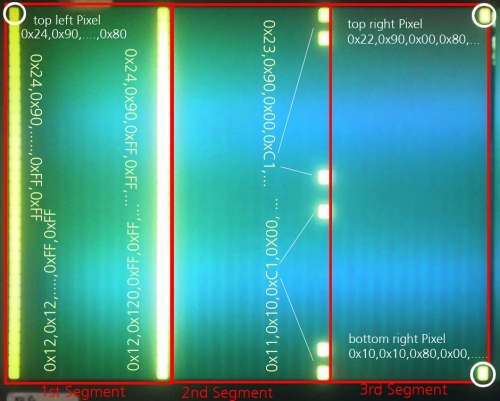
This represents the top left Pixel of the first module:
row_24 = [0xA1,0x24,0x90,0x00,0x00,0x00,0x00,0x00,0x90,0x00,0x00,0x00,0x00,0x00,0x90,0x00,0x00,0x00,0x00,0x00,0x90,0x00,0x00,0x00,0x00,0x00,0x90,0x00,0x00,0x00,0x00,0x80] # Testpattern
This represents the upper 16 Pixels from the most left collumn from the first module:
row_24 = [0xA1,0x24,0x90,0x00,0x00,0x00,0x00,0x00,0x90,0x00,0x00,0x00,0x00,0x00,0x90,0x00,0x00,0x00,0x00,0x00,0x90,0x00,0x00,0x00,0x00,0x00,0x90,0x00,0x00,0x00,0x00,0xFF] # Testpattern
row_12 = [0xA1,0x12,0x10,0x00,0x00,0x00,0x00,0x00,0x10,0x00,0x00,0x00,0x00,0x00,0x10,0x00,0x00,0x00,0x00,0x00,0x10,0x00,0x00,0x00,0x00,0x00,0x10,0x00,0x00,0x00,0x00,0xFF] # Testpattern
This represents all 16 Pixels from the most left collumn of the first module:
row_24 = [0xA1,0x24,0x90,0x00,0x00,0x00,0x00,0x00,0x90,0x00,0x00,0x00,0x00,0x00,0x90,0x00,0x00,0x00,0x00,0x00,0x90,0x00,0x00,0x00,0x00,0x00,0x90,0x00,0x00,0x00,0x00,0xFF] # Testpattern
row_12 = [0xA1,0x12,0x10,0x00,0x00,0x00,0x00,0x00,0x10,0x00,0x00,0x00,0x00,0x00,0x10,0x00,0x00,0x00,0x00,0x00,0x10,0x00,0x00,0x00,0x00,0x00,0x10,0x00,0x00,0x00,0x00,0xFF] # Testpattern
This represents all 16 Pixels in the first collumn and the first 12 Pixels from the third row (evethough all 8 bits from the odd and the even row are high) so the lower 2 bits in the first byte after the las 0x90 and 0x10 are ignored! 0xFF shows the same as 0xFC
row_24 = [0xA1,0x24,0x90,0x00,0x00,0x00,0x00,0x00,0x90,0x00,0x00,0x00,0x00,0x00,0x90,0x00,0x00,0x00,0x00,0x00,0x90,0x00,0x00,0x00,0x00,0x00,0x90,0xFF,0x00,0x00,0xFF,0xFF] # Testpattern
row_12 = [0xA1,0x12,0x10,0x00,0x00,0x00,0x00,0x00,0x10,0x00,0x00,0x00,0x00,0x00,0x10,0x00,0x00,0x00,0x00,0x00,0x10,0x00,0x00,0x00,0x00,0x00,0x10,0xFF,0x00,0x00,0xFF,0xFF] # Testpattern
This represents the lowest right Pixel of the first third of the first module:
row_24 = [0xA1,0x24,0x90,0x00,0x00,0x00,0x00,0x00,0x90,0x00,0x00,0x00,0x00,0x00,0x90,0x00,0x00,0x00,0x00,0x00,0x90, 0x00,0xFF, 0x00,0x00, 0x00,0x90,0x80, 0x00,0x80, 0x00,0x00] # Testpattern
row_12 = [0xA1,0x12,0x10,0x80,0x00,0x00,0x00,0x00,0x10,0x00,0x00,0x00,0x00,0x00,0x10,0x00,0x00,0x00,0x00,0x00,0x10, 0x00,0xFF, 0x00,0x00, 0x00,0x10,0x00, 0x00,0x00, 0x00,0x00] # Testpattern
So, the bottom right Pixel of the first module is:
row_10 = [0xA1,0x10,0x10,0x80,0x00,0x00,0x00,0x00,0x10,0x00,0x00,0x00,0x00,0x00,0x10,0x00,0x00,0x00,0x00,0x00,0x10, 0x00,0xFF, 0x00,0x00, 0x00,0x10,0x00, 0x00,0x00, 0x00,0x00] # Testpattern
This represents the following Pattern:
row_24 = [0xA1,0x24,0x90,0xFF,0xFF,0x00,0x00,0x00,0x90,0x00,0x00,0x00,0x00,0x00,0x90,0x00,0x00,0x00,0x00,0x00,0x90,0x00,0x00,0x00,0x00,0x00,0x90,0x00,0x00,0x00,0xFF,0xFF] # Testpattern
row_12 = [0xA1,0x12,0x10,0xFF,0xFF,0x00,0x00,0x00,0x10,0x00,0x00,0x00,0x00,0x00,0x10,0x00,0x00,0x00,0x00,0x00,0x10,0x00,0x00,0x00,0x00,0x00,0x10,0x00,0x00,0x00,0xFF,0xFF] # Testpattern
row_23 = [0xA1,0x23,0x90,0x00,0xC1,0x00,0x00,0x00,0x90,0x00,0x00,0x00,0x00,0x00,0x90,0x00,0x00,0x00,0x00,0x00,0x90,0x00,0x00,0x00,0x00,0x00,0x90,0x00,0x00,0x00,0x00,0x00] # Testpattern
row_11 = [0xA1,0x11,0x10,0xC1,0x00,0x00,0x00,0x00,0x10,0x00,0x00,0x00,0x00,0x00,0x10,0x00,0x00,0x00,0x00,0x00,0x10,0x00,0x00,0x00,0x00,0x00,0x10,0x00,0x00,0x00,0x00,0x00] # Testpattern
row_22 = [0xA1,0x22,0x90,0x00,0x80,0x00,0x00,0x00,0x90,0x00,0x00,0x00,0x00,0x00,0x90,0x00,0x00,0x00,0x00,0x00,0x90,0x00,0x00,0x00,0x00,0x00,0x90,0x00,0x00,0x00,0x00,0x00] # Testpattern
row_10 = [0xA1,0x10,0x10,0x80,0x00,0x00,0x00,0x00,0x10,0x00,0x00,0x00,0x00,0x00,0x10,0x00,0x00,0x00,0x00,0x00,0x10,0x00,0x00,0x00,0x00,0x00,0x10,0x00,0x00,0x00,0x00,0x00] # Testpattern
Geändert von schmid01 am 17.Jan.2023 1:05
|
|
| |
Beitragsbewertung:
|
xd19@o2.pl
Siedler
49 Beiträge
|
RE: Gorba Frontanzeige und CU5 hacking, 23 Jan. 2023 00:28
|
Impressive finds :)
Though, I try to apply it to the "Weihnachten" dump and don‘t get anything.
I have such piece of code https://pastebin.com/Hp2k49hR and if I got this right and coded it right, it should generally work but the output is a mess.
|
|
| |
Beitragsbewertung:
|
schmid01
Siedler
7 Beiträge
|
RE: Gorba Frontanzeige und CU5 hacking, 23 Jan. 2023 18:50
|
What do you use as an Interface to connect to the Alpha-Bus?
|
|
| |
Beitragsbewertung:
|
xd19@o2.pl
Siedler
49 Beiträge
|
RE: Gorba Frontanzeige und CU5 hacking, 23 Jan. 2023 19:58
|
I don‘t have such display, I‘m just working on your data. Though eventually I think I‘ll grab one from somewhere since the monobus is quite common in used buses here (but rather with C3/C5, not CU3/CU5 controllers).
Though I think the best way to implement it would be to use a pair of transistors in open-drain (pull-down only) mode, first one to invert TX and second to pull down and a pull-up resistor or current source to set the default level. Maybe some buffer/multiplexer on RX line would also be handy not to receive own data.
BTW, do you maybe have some other type of display? I‘m wondering if FD or LED displays also have such crazy data organization
|
|
| |
Beitragsbewertung:
|
schmid01
Siedler
7 Beiträge
|
RE: Gorba Frontanzeige und CU5 hacking, 23 Jan. 2023 20:09
|
This is my Interface  A NPN Transistor, two Optocouppler and a HEX Inverter. Because of the latency I was not able to get rid of the sent TX Data on the RX. So I have to do this in Software. Do you have any sugestion to realise this in Hardware? A NPN Transistor, two Optocouppler and a HEX Inverter. Because of the latency I was not able to get rid of the sent TX Data on the RX. So I have to do this in Software. Do you have any sugestion to realise this in Hardware?
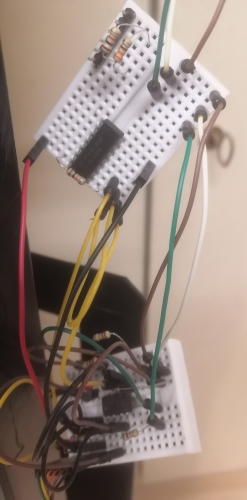
I also uploaded my current Python Script to Github. It‘s far from clean code, but it works! And it schould be easy to understand, since it sends the telegrams step by step.
https://github.com/d3bu9/alpha-bus/blob/main/alpha.py
I‘m Pretty New to such Displays. I got a Split-Flap form SBB and got it working via RS485. But then I was looking for something more dynamic, that ist capable to show "scrolling" text. I was looking for a Flipdot and got this huge Front LCD instead.
Now I‘m working on that until I got it hacked ;-)
A Flip-Dot as a next Project would be nice though.
Geändert von schmid01 am 23.Jan.2023 20:16
|
|
| |
Beitragsbewertung:
|
xd19@o2.pl
Siedler
49 Beiträge
|
RE: Gorba Frontanzeige und CU5 hacking, 23 Jan. 2023 20:35
|
Actually I think you can just use a buffer (eg 74LV245) and control it as RS485 transceiver - set nOE to 1 while sending should block the signal. You can use RS485 signal from FTDI or RTS from UART. I think I wouldn‘t bother with transoptors on RX side on the bench (actually, on TX as well :D ), resistor divider should be enough.
And actually I think you can try to do some scrolling on flip dot but it would be a little expensive. If you reduce multiplexing, for example by making a separate high side controller for every segment, set higher current (~350-500 mA should be enough for fast switching) and optimize changes, you should be able to switch it pretty fast.
|
|
| |
Beitragsbewertung:
|
xd19@o2.pl
Siedler
49 Beiträge
|
RE: Gorba Frontanzeige und CU5 hacking, 03 Apr. 2023 15:12
|
I actually found that the protocol has already been cracked:
https://github.com/Mezgrman/pyIBISv2/blob/master/ibis/mono_protocol.py
And it looks that LED displays have a little bit different checksum :O
|
|
| |
Beitragsbewertung:
|
|
|
|